- Сообщений: 2
- Спасибо получено: 0
Правила раздела:
1 Задавайте конкретные вопросы. Для болтовни есть свободный раздел.
2 По возможности давайте конкретные ответы.
3 Один вопрос=одна тема. Если хотите задать ещё вопрос, то начинайте новую тему.
4 Название темы должно составлять сам вопрос, и быть максимально конкретным. Рекомендуется начинать тему словами "Как", "Что", "Почему". А первый пост повторяет вопрос и даёт расширенные сведения.
5 Рекомендуется указывать версию мейкера (2000, 2003, RMXP, RMVX, ACE, IGM, и.т.д.. Это важно, и всё равно ведь спросят.
6 Темы "Пара вопросов", "Помогите", и подобные им - самый лёгкий путь к бану.
7 Поиск находится вверху справа.
А. Названия подразделов этого раздела уточняются. Советы принимаются.
1 Задавайте конкретные вопросы. Для болтовни есть свободный раздел.
2 По возможности давайте конкретные ответы.
3 Один вопрос=одна тема. Если хотите задать ещё вопрос, то начинайте новую тему.
4 Название темы должно составлять сам вопрос, и быть максимально конкретным. Рекомендуется начинать тему словами "Как", "Что", "Почему". А первый пост повторяет вопрос и даёт расширенные сведения.
5 Рекомендуется указывать версию мейкера (2000, 2003, RMXP, RMVX, ACE, IGM, и.т.д.. Это важно, и всё равно ведь спросят.
6 Темы "Пара вопросов", "Помогите", и подобные им - самый лёгкий путь к бану.
7 Поиск находится вверху справа.
А. Названия подразделов этого раздела уточняются. Советы принимаются.
Отображение экипировки на персонаже(VXAce)
- Yodakorejz
-
 Автор темы
- Не в сети
- Путник
-

Скрыть
Больше
10 года 2 мес. назад - 10 года 2 мес. назад #93360
от Yodakorejz
Yodakorejz создал тему: Отображение экипировки на персонаже(VXAce)
Не отображается надетая на персонажа экипировка, будь то оружие или броня. 
Экипировки как будто нет, так должно быть? Как то можно это исправить?
Экипировки как будто нет, так должно быть? Как то можно это исправить?
Последнее редактирование: 10 года 2 мес. назад пользователем Yodakorejz.
Пожалуйста Войти или Регистрация, чтобы присоединиться к беседе.


10 года 2 мес. назад - 10 года 2 мес. назад #93361
от Волчонок
Ленивый волчонок с большими амбициями
Рассказ "Рождение мага" , периодически обновляется
РПГ История Егеря . Основной текущий проект.
Волчонок ответил в теме Отображение экипировки на персонаже(VXAce)
Так и должно быть. Что бы броня отображалась, придётся тебе использовать скрипты, к примеру
Victor Visual Equip
.
Как его использовать недавно обсуждалось .
Как его использовать недавно обсуждалось .
Ленивый волчонок с большими амбициями
Рассказ "Рождение мага" , периодически обновляется
РПГ История Егеря . Основной текущий проект.
ВНИМАНИЕ: Спойлер!
Смерть идёт,
Покой нальёт
Людям всем, и сбежит морок...
Но пока в нём живут,
Но пока в нём растут,
Не видать нам вины
Как неба в крови.
Покой нальёт
Людям всем, и сбежит морок...
Но пока в нём живут,
Но пока в нём растут,
Не видать нам вины
Как неба в крови.
Последнее редактирование: 10 года 2 мес. назад пользователем Волчонок. Причина: Забыл точку поставить =/
Спасибо сказали: Yodakorejz
Пожалуйста Войти или Регистрация, чтобы присоединиться к беседе.
- strelokhalfer
-

- Не в сети
- Архитектор миров
-

- Знатный грамотей


Скрыть
Больше
- Сообщений: 1640
- Спасибо получено: 1080
10 года 2 мес. назад #93362
от strelokhalfer
"Стрелок, что-то ты неочень похож на свой аватар..."(с)
strelokhalfer ответил в теме Отображение экипировки на персонаже(VXAce)
Ты видимо не играл в игры на мейкере?
Да, экипировка по стандарту не отображается, что бы она отображалась нужно два скрипта
Victor's Basic Module и Victor's Visual Equps
Да, экипировка по стандарту не отображается, что бы она отображалась нужно два скрипта
Victor's Basic Module и Victor's Visual Equps
"Стрелок, что-то ты неочень похож на свой аватар..."(с)
Спасибо сказали: Yodakorejz
Пожалуйста Войти или Регистрация, чтобы присоединиться к беседе.
- Yodakorejz
-
Автор темы
- Не в сети
- Путник
-
Скрыть
Больше
- Сообщений: 2
- Спасибо получено: 0
10 года 2 мес. назад #93363
от Yodakorejz
Yodakorejz ответил в теме Отображение экипировки на персонаже(VXAce)
Спасибо большое 
Пожалуйста Войти или Регистрация, чтобы присоединиться к беседе.

10 года 1 мес. назад #93691
от S.DJ.S
S.DJ.S ответил в теме Отображение экипировки на персонаже(VXAce)
А как скрипт устанавливать? И куда? нужно ли настраивать?
Пожалуйста Войти или Регистрация, чтобы присоединиться к беседе.


Скрыть
Больше
- Сообщений: 1597
- Спасибо получено: 1522
10 года 1 мес. назад #93692
от Демий
Вначале темы есть ссылка на обсуждение настроек. А устанавливать как все скрипты в редакторе скриптов ниже материалс и выше майн.
Демий ответил в теме Отображение экипировки на персонаже(VXAce)
S.DJ.S пишет: А как скрипт устанавливать? И куда? нужно ли настраивать?
Вначале темы есть ссылка на обсуждение настроек. А устанавливать как все скрипты в редакторе скриптов ниже материалс и выше майн.
Пожалуйста Войти или Регистрация, чтобы присоединиться к беседе.
10 года 1 мес. назад #93694
от S.DJ.S
Вы уж простите, не все же тут опытные. Я вообще новичок.
S.DJ.S ответил в теме Отображение экипировки на персонаже(VXAce)
ну я читал и ничего не понял. Там больше болтали не о чём, чем обсуждали что-то. А как что куда вставлять, не указали. Вот зафигачу этот скрипт, а потом как минимум не будет работать, или вообще игра вылетать будет.Демий пишет:
S.DJ.S пишет: А как скрипт устанавливать? И куда? нужно ли настраивать?
Вначале темы есть ссылка на обсуждение настроек. А устанавливать как все скрипты в редакторе скриптов ниже материалс и выше майн.
Вы уж простите, не все же тут опытные. Я вообще новичок.
Пожалуйста Войти или Регистрация, чтобы присоединиться к беседе.
Скрыть
Больше
- Сообщений: 1597
- Спасибо получено: 1522
10 года 1 мес. назад #93695
от Демий
Демий ответил в теме Отображение экипировки на персонаже(VXAce)
Хорошо, коли самостоятельно лень немного почитать, вот прошу - наглядный пример. На все остальные вопросы есть ответы в той теме:
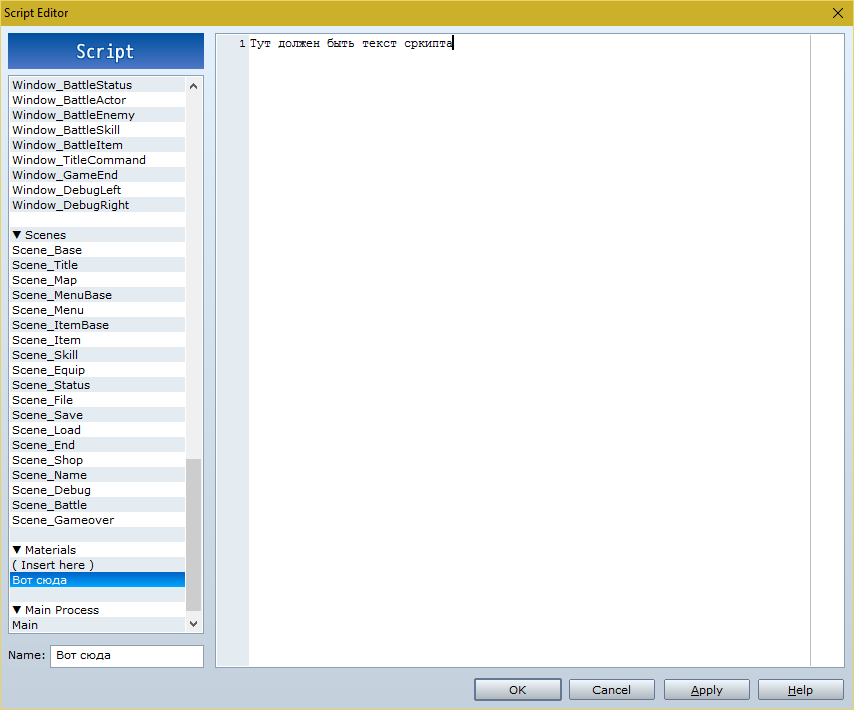
как установить скрипт
Пожалуйста Войти или Регистрация, чтобы присоединиться к беседе.
10 года 1 мес. назад #93696
от S.DJ.S
И вставить туда куда вы мне показали и всё. И дело в шляпе. Там наверное ещё что-то надо, как-то его настроить, но как именно, я не понимаю. Объясните нормально, чтобы новичку понятно было.
S.DJ.S ответил в теме Отображение экипировки на персонаже(VXAce)
Не лень, я уже 3 раза перечитал всю тему, и непонятно даже что они там обсуждают. И судя по тому как много и долго они болтали про этот скрипт, получается что там надо не просто взять это:Демий пишет: Хорошо, коли самостоятельно лень немного почитать, вот прошу - наглядный пример. На все остальные вопросы есть ответы в той теме:
как установить скрипт
Code:
#==============================================================================
# ** Victor Engine - Visual Equip
#------------------------------------------------------------------------------
# Author : Victor Sant
#
# Version History:
# v 1.00 - 2012.01.07 > First release
# v 1.01 - 2012.01.09 > Fixed error with comment calls
# v 1.02 - 2012.01.14 > Fixed the positive sign on some Regular Expressions
# v 1.03 - 2012.01.15 > Fixed the Regular Expressions problem with "" and 灯
# v 1.04 - 2012.02.03 > Fixed problem with charsets with '!$' tag
# v 1.05 - 2012.02.08 > Compatibility with Animated Battle
# v 1.06 - 2012.02.21 > Fixed problem with "clear" and "default" tags
# v 1.07 - 2012.07.25 > Fixed Compatibility with Character Control and
# > Diagonal Movement
# v 1.08 - 2012.08.02 > Compatibility with Basic Module 1.27
#------------------------------------------------------------------------------
# This script allows to change the graphic of the chacter according to
# the equips and other conditions. It adds specific bitmaps to the character
# sprite. It's possible to set custom graphics to actors, classes, weapons
# armors and events.
#------------------------------------------------------------------------------
# Compatibility
# Requires the script 'Victor Engine - Basic Module' v 1.27 or higher
#
# * Overwrite methods
# class Game_Party < Game_Unit
# def characters_for_savefile
#
# class Sprite_Character < Sprite_Base
# def set_bitmap
# def get_sign
#
# class Window_Base < Window
# def draw_actor_graphic(actor, x, y)
# def draw_character(character_name, character_index, x, y)
#
# class Window_SaveFile < Window_Base
# def draw_party_characters(x, y)
#
# * Alias methods
# class << Cache
# def character(filename)
#
# class Game_Actor < Game_Battler
# def setup(actor_id)
#
# class Game_Event < Game_Character
# def init_private_members
# def setup_page_settings
#
# class Game_Interpreter
# def comment_call
#
# class Sprite_Character < Sprite_Base
# def graphic_changed?
# def update_character_info
#
# class Scene_Map
# def start
#
#------------------------------------------------------------------------------
# Comment calls note tags:
# Tags to be used in events comment box, works like a script call.
#
# <change actor visual> <change event visual>
# settings settings
# </change actor visual> </change actor visual>
# This comment call will add a new visual part to the actor or event.
# Add the following values to the info. The ID, must be added, other
# values are optional.
# id: x : actor or event ID
# name: "x" : equip part filename. ("filename")
# index: x : equip part charset index, if using 8 chars charsets. (0-7)
# hue: x : equip part hue. (0-360)
# priority: x : part display priority. (default = 0, can be negative)
#
# <clear actor visual: i> <clear event visual: i>
# This comment call will remove all event or actor visual parts. On actors
# this will not remove parts from equips, only the natural actor/class parts.
# id: x : actor or event ID
#
# <default actor visual: i> <default event visual: i>
# This comment call will restore all event or actor visual parts. On actors
# this will not change parts from equips, only the natural actor/class parts.
# i : actor or event ID
#
# <event clone actor: x, y>
# This comment call allows clone the visual equip settings of a actor into
# the event, useful for cutscenes.
# x : event ID
# y : cloned actor id
#
# <event clone party: x, y>
# This comment call allows clone the visual equip settings of a party member
# into the event, useful for cutscenes.
# x : event ID
# y : cloned actor index
#
#------------------------------------------------------------------------------
# Comment Boxes note tags:
# Tags to be used on Events Comment boxes. The comment boxes are different
# from the comment call, they're called always the event refresh.
#
# <clone actor: x>
# This comment tag allows clone the visual equip settings of a actor into
# an event, useful for cut scenes.
# x : cloned actor ID
#
# <clone party: x>
# This comment tag allows clone the visual equip settings of a party member
# into the event, useful for cut scenes.
# x : cloned actor ID
#
#------------------------------------------------------------------------------
# Actors, Classes, Weapons, Armors and Comment Boxes note tags:
# Tags to be used on Actors, Classes, Weapons, Armors note boxes and
# Events Comment boxes. The comment boxes are different from the comment
# call, they're called always the event refresh.
#
# <visual part>
# settings
# </visual part>
# This tag will add a new visual part to the actor or event visual.
# Add the following values to the info. The ID, must be added, other
# values are optional.
# id: x : actor or event ID
# name: "x" : equip part filename. ("filename")
# index: x : equip part charset index, if using 8 chars charsets. (0-7)
# hue: x : equip part hue. (0-360)
# priority: x : part display priority. (default = 0, can be negative)
#
#------------------------------------------------------------------------------
# Additional instructions:
#
# The extra graphics from the visual items are added to the original bitmap.
#
# The visual item files are independent graphics that are added on the
# character bitmap.
#
# The priority is an arbitrary numeric value set to the visual item to decide
# wich graphics will be displayed above the other, the character graphic
# have a priority of 0 by default.
#
# It's possible to set more than a single graphic to one equipment, so you
# use that to have parts with different properties on the same equip.
# This can be used to make things like wings, wich stay behind the char if
# facing down, but in front of the char if facing up, and other things.
#
# It's possible to have some equipment graphic to change according to
# the character base graphic. Create a file with the character filename + the
# visual item filename. ("character filename" + "visual item filename")
# You can use this to make items that have different graphics depending
# on the character, like a different armor for males and females
#
#==============================================================================
#==============================================================================
# ** Victor Engine
#------------------------------------------------------------------------------
# Setting module for the Victor Engine
#==============================================================================
module Victor_Engine
#--------------------------------------------------------------------------
# * required
# This method checks for the existance of the basic module and other
# VE scripts required for this script to work, don't edit this
#--------------------------------------------------------------------------
def self.required(name, req, version, type = nil)
if !$imported[:ve_basic_module]
msg = "The script '%s' requires the script\n"
msg += "'VE - Basic Module' v%s or higher above it to work properly\n"
msg += "Go to http://victorenginescripts.wordpress.com/ to download this script."
msgbox(sprintf(msg, self.script_name(name), version))
exit
else
self.required_script(name, req, version, type)
end
end
#--------------------------------------------------------------------------
# * script_name
# Get the script name base on the imported value, don't edit this
#--------------------------------------------------------------------------
def self.script_name(name, ext = "VE")
name = name.to_s.gsub("_", " ").upcase.split
name.collect! {|char| char == ext ? "#{char} -" : char.capitalize }
name.join(" ")
end
end
$imported ||= {}
$imported[:ve_visual_equip] = 1.08
Victor_Engine.required(:ve_visual_equip, :ve_basic_module, 1.27, :above)
Victor_Engine.required(:ve_visual_equip, :ve_character_control, 1.00, :bellow)
Victor_Engine.required(:ve_visual_equip, :ve_multi_frames, 1.00, :bellow)
#==============================================================================
# ** Cache
#------------------------------------------------------------------------------
# This module loads each of graphics, creates a Bitmap object, and retains it.
# To speed up load times and conserve memory, this module holds the created
# Bitmap object in the internal hash, allowing the program to return
# preexisting objects when the same bitmap is requested again.
#==============================================================================
class << Cache
#--------------------------------------------------------------------------
# * Alias method: character
#--------------------------------------------------------------------------
alias :character_ve_visual_equip :character
def character(filename, hue = 0, list = [], sufix = "")
if !list || list.empty?
character_ve_visual_equip(filename, hue)
elsif !@cache.include?(list + [sufix]) || @cache[list + [sufix]].disposed?
equip_character(filename, list, sufix)
else
@cache[list + [sufix]]
end
end
#--------------------------------------------------------------------------
# * New method: equip_character
#--------------------------------------------------------------------------
def equip_character(filename, list, sufix)
@cache ||= {}
bitmap = load_character_bitmap(filename, list, sufix)
bitmap = bitmap_blt(filename, list, bitmap, sufix)
bitmap
end
#--------------------------------------------------------------------------
# * New method: load_character_bitmap
#--------------------------------------------------------------------------
def load_character_bitmap(filename, list, sufix)
bitmap = load_bitmap("Graphics/Characters/", filename).clone
bitmap = expand_bitmap(bitmap) if filename =~ /^[!]?[$].*/i
bitmap.clear
bitmap
end
#--------------------------------------------------------------------------
# * New method: get_bitmap
#--------------------------------------------------------------------------
def get_bitmap(filename, part, sufix)
base = part[:name] =~ /^[!]?[$](.*)/i ? $1 : part[:name]
char = filename + base
pose = part[:name] + sufix
file = filename + base + sufix
name = character_exist?(char) ? char : part[:name]
name = character_exist?(pose) ? pose : name
name = character_exist?(file) ? file : name
bmp = ["Graphics/Characters/", name, part[:hue]]
[load_bitmap(*bmp).clone, name] rescue [empty_bitmap, name]
end
#--------------------------------------------------------------------------
# * New method: expand_bitmap
#--------------------------------------------------------------------------
def expand_bitmap(bitmap)
old_bmp = bitmap.dup
bitmap = Bitmap.new(old_bmp.width * 4, old_bmp.height * 2)
bitmap.blt(0, 0, old_bmp, old_bmp.rect)
old_bmp.dispose
bitmap
end
#--------------------------------------------------------------------------
# * New method: bitmap_blt
#--------------------------------------------------------------------------
def bitmap_blt(filename, list, bitmap, sufix)
values = []
list.each do |part|
setting = equip_bitmap_info(filename, part, sufix)
values += equip_bitmap_settings(*setting)
end
values.sort {|a, b| a[4] <=> b[4]}.each do |value|
bitmap.blt(value[0], value[1], value[2], value[3])
end
@cache[list + [sufix]] = bitmap
bitmap
end
#--------------------------------------------------------------------------
# * New method: equip_bitmap_info
#--------------------------------------------------------------------------
def equip_bitmap_info(filename, part, sufix)
bmp, name = get_bitmap(filename, part, sufix)
w = bmp.width / (name[/^[!]?[$]./] ? 1 : 4)
h = bmp.height / (name[/^[!]?[$]./] ? 1 : 2)
x1 = (part[:index1] % 4) * w
y1 = (part[:index1] / 4) * h
x2 = (part[:index2] % 4) * w
y2 = (part[:index2] / 4) * h
[part, bmp, x1, y1, x2, y2, w, h]
end
#--------------------------------------------------------------------------
# * New method: equip_bitmap_settings
#--------------------------------------------------------------------------
def equip_bitmap_settings(part, bmp, x1, y1, x2, y2, w, h)
values = []
values.push([x2, y2, bmp, Rect.new(x1, y1, w, h), part[:priority]])
values
end
end
#==============================================================================
# ** Game_Actor
#------------------------------------------------------------------------------
# This class handles actors. It's used within the Game_Actors class
# ($game_actors) and referenced by the Game_Party class ($game_party).
#==============================================================================
class Game_Actor < Game_Battler
#--------------------------------------------------------------------------
# * Alias method: setup
#--------------------------------------------------------------------------
alias :setup_ve_visual_equip :setup
def setup(actor_id)
setup_ve_visual_equip(actor_id)
@actor_parts = []
@visual_parts = []
@equip_parts = []
default_visual_parts
end
#--------------------------------------------------------------------------
# * New method: default_visual_parts
#--------------------------------------------------------------------------
def default_visual_parts
clear_visual_parts
regexp = get_all_values("VISUAL PART")
note.scan(regexp) { set_visual_parts($1) }
self.class.note.scan(regexp) { set_visual_parts($1) }
end
#--------------------------------------------------------------------------
# * New method: set_visual_parts
#--------------------------------------------------------------------------
def set_visual_parts(info)
@visual_parts.push(info)
end
#--------------------------------------------------------------------------
# * New method: clear_visual_parts
#--------------------------------------------------------------------------
def clear_visual_parts
@visual_parts.clear
end
#--------------------------------------------------------------------------
# * New method: visual_items
#--------------------------------------------------------------------------
def visual_items(part = nil)
(part ? [part] : [default_part]) + character_items + equip_items
end
#--------------------------------------------------------------------------
# * New method: default_part
#--------------------------------------------------------------------------
def default_part
{name: @character_name, index1: @character_index, index2: @character_index,
hue: hue, priority: 0}
end
#--------------------------------------------------------------------------
# * New method: character_items
#--------------------------------------------------------------------------
def character_items
return @actor_parts if @actor_visual == @visual_parts
@actor_visual = @visual_parts.dup
@actor_parts.clear
@visual_parts.each {|part| @actor_parts.push(set_part(part)) }
@actor_parts
end
#--------------------------------------------------------------------------
# * New method: equip_items
#--------------------------------------------------------------------------
def equip_items
return @equip_parts if @actor_equips == equips
@actor_equips = equips.dup
@equip_parts.clear
regexp = get_all_values("VISUAL PART")
equips.compact.each {|eqp| @equip_parts += equip_parts(eqp.note, regexp) }
@equip_parts
end
#--------------------------------------------------------------------------
# * New method: equip_parts
#--------------------------------------------------------------------------
def equip_parts(note, regexp)
parts = []
note.scan(regexp) {parts.push(set_part($1)) }
parts
end
#--------------------------------------------------------------------------
# * New method: set_part
#--------------------------------------------------------------------------
def set_part(value)
part = {}
part[:name] = value =~ /NAME: #{get_filename}/i ? $1.to_s : ""
part[:index1] = value =~ /INDEX: (\d+)/i ? $1.to_i : 0
part[:hue] = value =~ /HUE: (\d+)/i ? $1.to_i : 0
part[:priority] = value =~ /PRIORITY: ([+-]?\d+)/i ? $1.to_i : 1
part[:index2] = character_index
part
end
end
#==============================================================================
# ** Game_Party
#------------------------------------------------------------------------------
# This class handles the party. It includes information on amount of gold
# and items. The instance of this class is referenced by $game_party.
#==============================================================================
class Game_Party < Game_Unit
#--------------------------------------------------------------------------
# * Overwrte method: characters_for_savefile
#--------------------------------------------------------------------------
def characters_for_savefile
battle_members.collect do |actor|
[actor.character_name, actor.character_index, actor.visual_items.dup]
end
end
end
#==============================================================================
# ** Game_CharacterBase
#------------------------------------------------------------------------------
# This class deals with characters. Common to all characters, stores basic
# data, such as coordinates and graphics. It's used as a superclass of the
# Game_Character class.
#==============================================================================
class Game_CharacterBase
#--------------------------------------------------------------------------
# * New method: visual_items
#--------------------------------------------------------------------------
def visual_items
[default_part]
end
#--------------------------------------------------------------------------
# * New method: default_part
#--------------------------------------------------------------------------
def default_part
{name: @character_name, index1: @character_index, index2: @character_index,
hue: hue, priority: 0}
end
end
#==============================================================================
# ** Game_Event
#------------------------------------------------------------------------------
# This class deals with events. It handles functions including event page
# switching via condition determinants, and running parallel process events.
# It's used within the Game_Map class.
#==============================================================================
class Game_Event < Game_Character
#--------------------------------------------------------------------------
# * Alias method: init_private_members
#--------------------------------------------------------------------------
alias :init_private_members_ve_visual_equip :init_private_members
def init_private_members
init_private_members_ve_visual_equip
@visual_parts = []
@event_parts = []
default_visual_parts
end
#--------------------------------------------------------------------------
# * Alias method: setup_page_settings
#--------------------------------------------------------------------------
alias :setup_page_settings_ve_visual_equip :setup_page_settings
def setup_page_settings
setup_page_settings_ve_visual_equip
default_visual_parts
end
#--------------------------------------------------------------------------
# * New method: default_visual_parts
#--------------------------------------------------------------------------
def default_visual_parts
clear_visual_parts
regexp = get_all_values("VISUAL PART")
note.scan(regexp) { set_visual_parts($1) }
default_clone_visual
end
#--------------------------------------------------------------------------
# * New method: set_visual_parts
#--------------------------------------------------------------------------
def set_visual_parts(info)
@visual_parts.push(info)
end
#--------------------------------------------------------------------------
# * New method: default_clone_visual
#--------------------------------------------------------------------------
def default_clone_visual
note.scan(/<CLONE (ACTOR|PARTY): (\d+)>/i) do
actor = $game_actors[$2.to_i] if $1.upcase == "ACTOR"
actor = $game_party.members[$2.to_i - 1] if $1.upcase == "PARTY"
set_cloned_visual(actor.clone.visual_items.dup) if actor
end
end
#--------------------------------------------------------------------------
# * New method: clear_visual_parts
#--------------------------------------------------------------------------
def clear_visual_parts
@clone_visual = nil
end
#--------------------------------------------------------------------------
# * New method: visual_items
#--------------------------------------------------------------------------
def visual_items
@clone_visual ? @clone_visual : [default_part] + character_items
end
#--------------------------------------------------------------------------
# * New method: set_cloned_visual
#--------------------------------------------------------------------------
def set_cloned_visual(visual)
@clone_visual = visual.clone
@clone_visual.each {|visual| visual[:index2] = character_index }
end
#--------------------------------------------------------------------------
# * New method: character_items
#--------------------------------------------------------------------------
def character_items
return @event_parts if @event_visual == @visual_parts
@event_visual = @visual_parts.dup
@event_parts.clear
@visual_parts.each {|part| @event_parts.push(set_part(part)) }
@event_parts
end
#--------------------------------------------------------------------------
# * New method: set_part
#--------------------------------------------------------------------------
def set_part(value)
part = {}
part[:name] = value =~ /NAME: #{get_filename}/i ? $1.to_s : ""
part[:index1] = value =~ /INDEX: (\d+)/i ? $1.to_i : 0
part[:hue] = value =~ /HUE: (\d+)/i ? $1.to_i : 0
part[:priority] = value =~ /PRIORITY: ([+-]?\d+)/i ? $1.to_i : 1
part[:index2] = character_index
part
end
end
#==============================================================================
# ** Game_Player
#------------------------------------------------------------------------------
# This class handles the player.
# The instance of this class is referenced by $game_map.
#==============================================================================
class Game_Player < Game_Character
#--------------------------------------------------------------------------
# * New method: visual_items
#--------------------------------------------------------------------------
def visual_items
actor ? actor.visual_items(default_part) : super
end
end
#==============================================================================
# ** Game_Follower
#------------------------------------------------------------------------------
# This class handles the followers. Followers are the actors of the party
# that follows the leader in a line. It's used within the Game_Followers class.
#==============================================================================
class Game_Follower < Game_Character
#--------------------------------------------------------------------------
# * New method: visual_items
#--------------------------------------------------------------------------
def visual_items
actor && $game_player.followers.visible ?
actor.visual_items(default_part) : super
end
end
#==============================================================================
# ** Game_Interpreter
#------------------------------------------------------------------------------
# An interpreter for executing event commands. This class is used within the
# Game_Map, Game_Troop, and Game_Event classes.
#==============================================================================
class Game_Interpreter
#--------------------------------------------------------------------------
# * Alias method: comment_call
#--------------------------------------------------------------------------
alias :comment_call_ve_visual_equip :comment_call
def comment_call
call_visual_changes
comment_call_ve_visual_equip
end
#--------------------------------------------------------------------------
# * New method: call_visual_changes
#--------------------------------------------------------------------------
def call_visual_changes
call_clear_visual("ACTOR VISUAL")
call_clear_visual("EVENT VISUAL")
call_change_visual("ACTOR VISUAL")
call_change_visual("EVENT VISUAL")
call_restore_visual("ACTOR VISUAL")
call_restore_visual("EVENT VISUAL")
call_clone_visual
end
#--------------------------------------------------------------------------
# * New method: call_change_visual
#--------------------------------------------------------------------------
def call_change_visual(type)
regexp = get_all_values("CHANGE #{type}")
note.scan(regexp) do
value = $1.dup
id = value =~ /ID: (\d+)/i ? $1.to_i : nil
object = $game_map.events[id] if id && type.upcase == "EVENT VISUAL"
object = $game_actors[id] if id && type.upcase == "ACTOR VISUAL"
object.set_visual_parts(value) if object
object.character_items if object
end
end
#--------------------------------------------------------------------------
# * New method: call_clear_visual
#--------------------------------------------------------------------------
def call_clear_visual(type)
note.scan(/<CLEAR #{type}: (\d+)>/i) do
id = $1.to_i
object = $game_map.events[id] if id && type.upcase == "ACTOR VISUAL"
object = $game_actors[id] if id && type.upcase == "ACTOR VISUAL"
object.clear_visual_parts if object
object.character_items if object
end
end
#--------------------------------------------------------------------------
# * New method: call_restore_visual
#--------------------------------------------------------------------------
def call_restore_visual(type)
note.scan(/<DEFAULT #{type}: (\d+)>/i) do
value = $1.dup
id = value =~ /ID: (\d+)/i ? $1.to_i : nil
object = $game_map.events[id] if id && type.upcase == "EVENT VISUAL"
object = $game_actors[id] if id && type.upcase == "ACTOR VISUAL"
object.default_visual_parts if object
object.character_items if object
end
end
#--------------------------------------------------------------------------
# * New method: call_clone_visual
#--------------------------------------------------------------------------
def call_clone_visual
note.scan(/<EVENT CLONE (ACTOR|PARTY): (\d+) *, *(\d+)>/i) do |pt, ev, ac|
event = $game_map.events[ev.to_i]
actor = $game_actors[ac.to_i] if pt.upcase == "ACTOR"
actor = $game_party.members[ac.to_i - 1] if pt.upcase == "PARTY"
next if !actor || !event
event.set_cloned_visual(actor.clone.visual_items.dup)
end
end
end
#==============================================================================
# ** Sprite_Character
#------------------------------------------------------------------------------
# This sprite is used to display characters. It observes a instance of the
# Game_Character class and automatically changes sprite conditions.
#==============================================================================
class Sprite_Character < Sprite_Base
#--------------------------------------------------------------------------
# * Overwrte method: set_bitmap
#--------------------------------------------------------------------------
def set_bitmap
sufix = $imported[:ve_diagonal_move] ? diagonal_sufix : ""
sufix = @pose_sufix ? sufix + @pose_sufix : sufix
self.bitmap = Cache.character(set_bitmap_name, hue, @visual_items, sufix)
end
#--------------------------------------------------------------------------
# * New method: get_sign
#--------------------------------------------------------------------------
def get_sign
nil
end
#--------------------------------------------------------------------------
# * Alias method: graphic_changed?
#--------------------------------------------------------------------------
alias :graphic_changed_ve_visual_equip? :graphic_changed?
def graphic_changed?
graphic_changed_ve_visual_equip? ||
@visual_items != @character.visual_items
end
#--------------------------------------------------------------------------
# * Alias method: update_character_info
#--------------------------------------------------------------------------
alias :update_character_info_ve_visual_equip :update_character_info
def update_character_info
update_character_info_ve_visual_equip
@visual_items = @character.visual_items.dup
end
end
#==============================================================================
# ** Window_Base
#------------------------------------------------------------------------------
# This is a superclass of all windows in the game.
#==============================================================================
class Window_Base < Window
#--------------------------------------------------------------------------
# * Overwrte method: draw_actor_graphic
#--------------------------------------------------------------------------
def draw_actor_graphic(actor, x, y)
parts = actor.visual_items
draw_character(actor.character_name, actor.character_index, x, y, parts)
end
#--------------------------------------------------------------------------
# * Overwrite method: draw_character
#--------------------------------------------------------------------------
def draw_character(character_name, character_index, x, y, parts = nil)
return unless character_name
@character_name = character_name
bitmap = parts ? get_parts(parts) : Cache.character(character_name)
sign = parts ? nil : character_name[/^[\!\$]./]
multi = $imported[:ve_multi_frames] && character_name[/\[F(\d+)\]/i]
frames = multi ? $1.to_i : 3
if sign && sign.include?('$')
cw = bitmap.width / frames
ch = bitmap.height / 4
else
cw = bitmap.width / (frames * 4)
ch = bitmap.height / 8
end
n = character_index
src_rect = Rect.new((n % 4 * 3 + 1) * cw, (n / 4 * 4) * ch, cw, ch)
contents.blt(x - cw / 2, y - ch, bitmap, src_rect)
end
#--------------------------------------------------------------------------
# * New method: get_parts
#--------------------------------------------------------------------------
def get_parts(parts)
Cache.character(@character_name, 0, parts)
end
end
#==============================================================================
# ** Window_SaveFile
#------------------------------------------------------------------------------
# This window displays save files on the save and load screens.
#==============================================================================
class Window_SaveFile < Window_Base
#--------------------------------------------------------------------------
# * Overwrte method: draw_party_characters
#--------------------------------------------------------------------------
def draw_party_characters(x, y)
header = DataManager.load_header(@file_index)
return unless header
header[:characters].each_with_index do |data, i|
draw_character(data[0], data[1], x + i * 48, y, data[2])
end
end
end
#==============================================================================
# ** Scene_Map
#------------------------------------------------------------------------------
# This class performs the map screen processing.
#==============================================================================
class Scene_Map
#--------------------------------------------------------------------------
# * Alias method: setup_page_settings
#--------------------------------------------------------------------------
alias :start_ve_visual_equip :start
def start
$game_map.events.values.each {|event| event.default_clone_visual }
start_ve_visual_equip
end
end
Victor Engine - Visual Equip.txt
Открыть в приложении "Google Документы"
Сергей Санников
(pwsakura@gmail.com)Victor Engine - Visual Equip.txt. На экране.
Пожалуйста Войти или Регистрация, чтобы присоединиться к беседе.


10 года 1 мес. назад #93707
от Luar_Zero
Может тогда не лезть сразу в скрипты, если не можешь понять его описание? Может начать с более простых вариантов отображения экипировки, т.е. заготовки заранее всех чаров со всеми комплектами? Не? Нам такое не подходит?
На второй странице темы Сиф давал ссылку на демку, ссылка рабочая. Качай и смотри, как у него устроено.
Luar_Zero ответил в теме Отображение экипировки на персонаже(VXAce)
Не лень, я уже 3 раза перечитал всю тему, и непонятно даже что они там обсуждают.
Может тогда не лезть сразу в скрипты, если не можешь понять его описание? Может начать с более простых вариантов отображения экипировки, т.е. заготовки заранее всех чаров со всеми комплектами? Не? Нам такое не подходит?
На второй странице темы Сиф давал ссылку на демку, ссылка рабочая. Качай и смотри, как у него устроено.
Пожалуйста Войти или Регистрация, чтобы присоединиться к беседе.
Время создания страницы: 0.081 секунд